
Poll the Crowd
No date yet? Offer a few days and let your guests weigh in.

What it is
Some plans start with a group and no date. Poll the Crowd lets you create the event anyway: on the "Who & when" step, choose Poll the Crowd instead of picking a date, pick the people you want to ask, and offer between two and ten options — a day, or a day with a specific time. The event exists from that moment, with the date marked as still being decided.
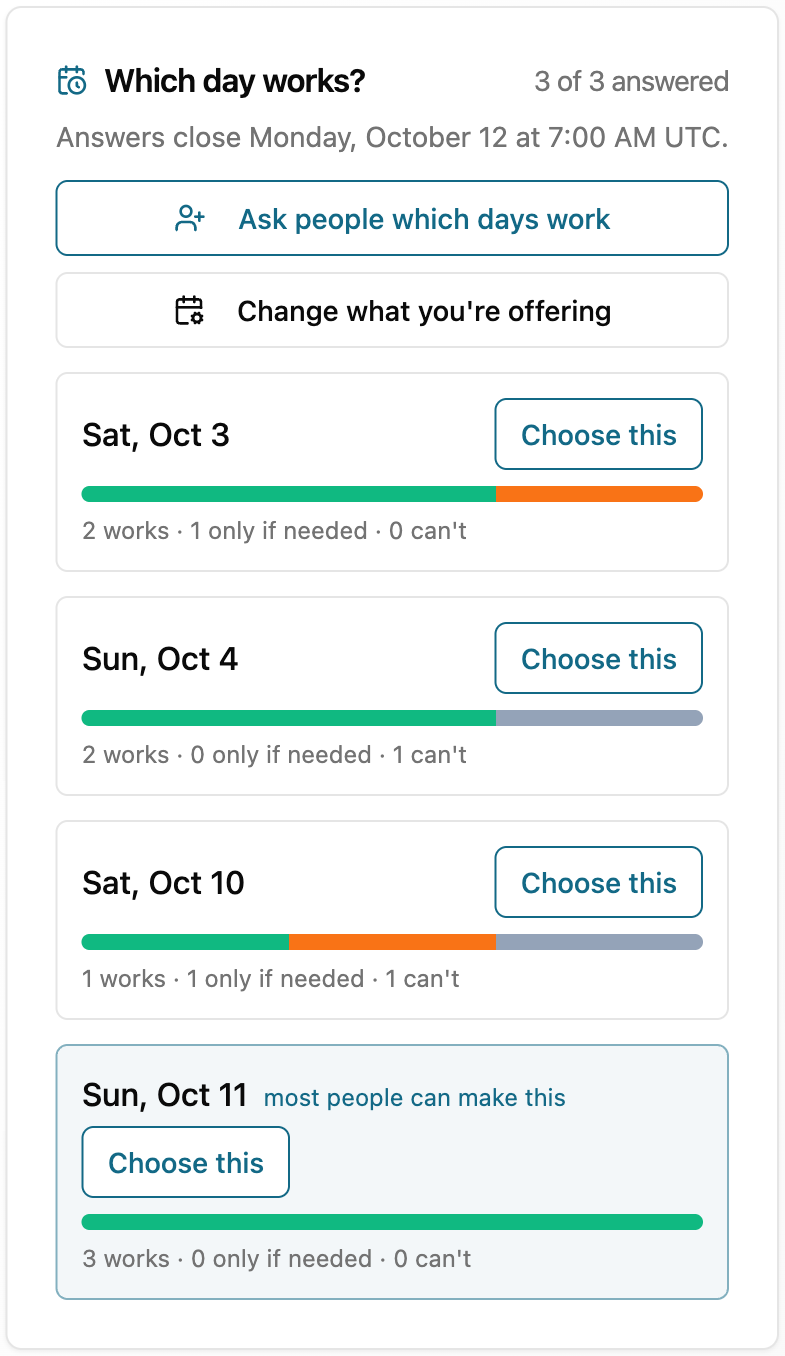
Everyone you asked answers each day with works, if needed, or can't — from the app if they have an account, or straight from the emailed link if they don't. You see the answers add up per day in the same style as calendar availability, and when a winner is clear you commit it (and set the time) and the event becomes an ordinary dated event: the decided date is what gets announced, and everyone who answered is already on the guest list.
How it works
- 1
Offer the days
On the "Who & when" step choose Poll the Crowd, pick who to ask, and add two to ten options — days, or days with a time. You can still change the days on offer while the poll is open.
- 2
Everyone answers
Each person marks every option works, if needed, or can't. Members answer in the app; anyone without an account answers from the emailed link. Being asked is being invited — they are on the guest list from the start.
- 3
Commit the winner
The results show the counts per day. Pick the day that works, set the time, and the event becomes a normal dated event — the decided date is what goes out. A poll also closes itself once its last offered day has passed.
Your privacy, protected
- Answers are collected for this one event and shown to its host as per-day counts. Nobody's calendar is read to answer a poll — a typed answer is exactly that, and it always wins over anything a connected calendar suggests.
- Guests without an account answer through a private link in their email. They are never asked to sign up to say which days work.
- MyOwnEvents only ever looks at polls in aggregate — never at who said what about a particular day.
Nobody ever sees your calendar — only whether you’re free or busy
Across every MyOwnEvents feature, your event titles, your guests, and your locations stay private. When we help you and your friends find a time, others see only whether you are free or busy — never the event details behind it. Your raw calendar events are never sold, never used for ads, and never sent to AI. Our scheduling assistant uses only the overall picture (like how many invitees are free at a given time) to suggest times — and that is never used to train AI models.
Explore more features
AI Event Assistant
Describe your event in plain English — our AI drafts the rest.
Smart Scheduling
Find a time that works for your group — without the group chat.
Google & Apple Calendar Sync
Connect Google or Apple once — stay in sync, no double-booking.
Sell Tickets & Tip Jar/Fee Free Payments
Host paid events or accept tips — money goes straight to you.
Split the Cost
Share what an event costs — MyOwnEvents takes nothing.
SMS & Smart Reminders
Never miss the moment that matters — by text.
Discover Events Near You
Find what’s happening around you — and RSVP in a tap.
Invite Anyone — No Account Needed
Invite friends by email or text — they RSVP without signing up.
Recurring Events
Set it once — your weekly game night runs itself.
Waitlists That Auto-Promote
Full event? Guests wait in line and get promoted automatically.
Group & Event Chat
Coordinate without leaving the app — or the group text.